
How to Reduce User Cognitive Load with Bento Grid Layouts

bento grid cognitive load

Have you ever visited a website and felt instantly overwhelmed? You’re not alone. In our digital world, users face a constant flood of information. This creates mental strain, a concept known as cognitive load.

When a site presents too much at once, visitors struggle. Their working memory gets overloaded. The result? They leave without engaging. This is a critical problem for any online platform.

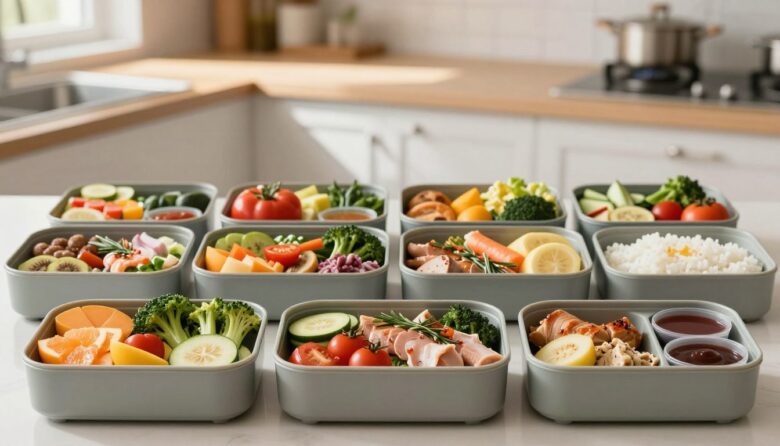
A powerful solution takes inspiration from Japanese bento boxes. These boxes neatly compartmentalize different foods. Similarly, a structured grid layout organizes content into clear, digestible modules.

This design philosophy transforms complex data. It guides the eye naturally from one section to the next. Companies like Apple use this method to showcase product features effectively. It helps people process information faster and with far less effort.

My goal in this guide is simple. I want to show you practical steps to build interfaces that respect your user’s attention. By reducing mental clutter, you can foster better engagement, lower bounce rates, and improve conversions. Let’s dive into the why and how.

Key Takeaways

  • Information overload causes significant mental strain for website visitors.
  • A compartmentalized design structure mimics the organization of a bento box.
  • This method allows users to process and scan information much more quickly.
  • It turns complex data sets into visually intuitive, manageable chunks.
  • Leading companies use this strategy to create cleaner, more effective interfaces.
  • Adopting this approach can lead to higher user engagement and better conversion rates.

Why Your Users Feel Overwhelmed (And How to Fix It)

We’ve all been there: staring at a screen, unsure where to click or what to read next. This common frustration stems from a basic psychological limit. Our working memory can only hold so much at once.

When a website crams everything into a single view, it crosses that limit. This creates what experts call extraneous mental strain. It’s the unnecessary effort spent just figuring out the interface itself.

Think about a page filled with uniform blocks and long paragraphs of text. There’s no clear starting point. Your eyes dart around, searching for a hook. This design approach forces visitors to work too hard.

The symptoms are easy to spot. People feel confused. They experience decision paralysis. Often, they simply leave. This directly hurts your site’s performance.

High bounce rates and low conversions are the business results of a poor user experience. Fixing this isn’t just about aesthetics. It’s about respecting your audience’s mental energy.

The remedy lies in smart compartmentalization. A bento grids structure, for instance, chunks information into neat, distinct modules. It transforms a wall of content into a series of manageable bites.

This method drastically cuts down that extraneous strain. It creates visual breathing room. The eye is guided naturally from one section to the next.

As noted by sources like Kloud Pixel Studios, this organized look improves clarity and readability. Users can scan, understand, and act with far less effort.

By addressing these core issues, you craft a more enjoyable and efficient journey. Understanding the problem is your first step toward a real solution. Let’s explore what makes this modular approach so effective.

What Is a Bento Grid? A Simple Analogy

Imagine opening a beautifully arranged Japanese lunchbox, where each item has its own dedicated space. That’s the core idea behind this popular design system. It’s a modular layout that uses compartments of different sizes to organize information.

Think of the main dish in the box as your primary content. The smaller compartments hold supporting details. Together, they create a complete and balanced presentation.

This approach is very different from old-fashioned, rigid grids. Those often use same-sized boxes in strict rows. A bento grid embraces asymmetry and modularity.

The result is a dynamic visual flow. Your eye moves naturally from one module to the next. Each section is self-contained but part of a unified whole.

It’s like serving a full meal on a single plate. You get variety without chaos. This philosophy is about presenting complex product details as digestible parts.

Leading tech companies, like Apple, use this method for feature summaries. It allows designers to highlight key elements. They can create clear visual pathways for the user’s attention.

This modular way of organizing can hold many content types. You can place images, text blocks, or videos in distinct sections. Everything finds its own spot.

Understanding the bento box analogy makes the benefits clear. It transforms an abstract concept into something visual and intuitive. Let’s see how it compares to traditional methods.

Comparing Layout Systems
Aspect Traditional Uniform Grid Bento Grid Layout
Structure Fixed, equal-sized columns and rows. Flexible, variable-sized modules.
Visual Flow Predictable, often static. Dynamic, guides the eye organically.
Content Flexibility Limited; content must fit uniform cells. High; modules adapt to content importance.
Primary Focus Order and alignment. Hierarchy and scannability.
Best Use Cases Data tables, image galleries. Product pages, dashboards, landing pages.

This comparison shows why the modular method is so effective for modern interfaces. It’s not just about looking neat. It’s about creating a logical path of understanding.

When you break information into clear chunks, you help people process it faster. They don’t have to work to find what matters. The design does that work for them.

The Core Benefits of Bento Grids for User Experience

Visualize a design that turns complexity into clarity at first glance. That’s the power of a well-structured modular system. It transforms how people interact with your site.

This approach offers distinct advantages for user experience. It makes information easy to grasp and act upon. Let’s explore the three core benefits that make this method so effective.

They Create a Digestible Overview

Complex data can feel intimidating. A modular system changes that. It breaks everything into simple, bite-sized pieces.

Users can understand the whole picture instantly. Each module acts like a chapter in a short story. Together, they form a complete and intuitive summary.

This is perfect for highlighting multiple product features. As noted by industry experts, this layout presents details in an intuitive way. People get the key points without digging.

The overview prevents information overload. It serves content in manageable portions. This directly reduces the mental strain on your visitors.

They Establish Instant Visual Hierarchy

Not all information is equally important. A smart design communicates this visually. Varying module sizes do the heavy lifting.

Larger sections naturally draw the eye first. They prioritize critical details. Smaller compartments support secondary points.

This hierarchy happens automatically. Users know where to look without being told. Their attention is guided by the structure itself.

It improves navigation and comprehension. People follow the visual cues you set. They spend less energy deciding what matters most.

They Promote Scannability and Focus

Online readers often scan rather than read word-for-word. A structured layout caters to this habit. It creates clear paths for the eye to follow.

The organized content allows eyes to move easily from one module to the next. Consistent margins and padding are key. They create clean separations between ideas.

This enhanced scannability keeps users focused. They stay on task and find what they need faster. The entire experience feels smooth and efficient.

All these benefits work together. They make the user’s job easier and more satisfying. The result is a more engaging and effective interface.

Core Benefits of Modular Layouts for User Experience
Benefit How It Works Key Outcome for the User
Digestible Overview Breaks complex information into distinct, bite-sized modules. Understands the full context quickly, without feeling overwhelmed.
Instant Visual Hierarchy Uses varying module sizes to signal importance visually. Knows where to focus first, guided by the design structure.
Enhanced Scannability & Focus Organizes content with clear visual separation and flow. Scans and finds information efficiently, maintaining task focus.

Adopting this modular philosophy leads to a visually appealing and clear interface. It respects the user’s time and mental energy. The cumulative effect is a superior experience that encourages deeper engagement.

Bento Grids and the Principles of Cognitive Load

Let’s unpack the science behind why some websites feel effortless while others drain your focus. The answer lies in a concept called cognitive load theory. It explains how our working memory processes new information.

This theory breaks mental effort into three types. Intrinsic load is the inherent difficulty of the subject. Extraneous load is the strain caused by poor presentation. Germane load is the positive effort used to build understanding.

Good interface design directly targets the extraneous type. It aims to eliminate unnecessary mental friction. This allows people to apply their energy to learning and doing.

A detailed diagram illustrating the principles of cognitive load theory, featuring a bento grid layout. In the foreground, each grid cell clearly contains distinct elements such as icons, flowcharts, and colorful visual aids representing intrinsic, extraneous, and germane cognitive load. In the middle, connect the elements with thin lines or arrows to demonstrate the relationships between them, ensuring clarity and coherence. The background should have a subtle gradient, suggesting a dynamic yet professional atmosphere. Use soft, diffused lighting to enhance the visual appeal, and present the diagram from a slightly elevated angle for a three-dimensional effect. The overall mood should be informative and engaging, suitable for a scholarly article on cognitive load reduction strategies.

A modular system like a bento grid is a powerful tool for this. It cuts through visual noise by grouping related content. This organization slashes the extraneous strain on your visitors.

Think about a dense, uniform page. It forces users to hunt for meaning. A compartmentalized design does that work for them. Each clear module acts as a guidepost.

This structure also supports germane load. It helps people form mental schemas—patterns for understanding. When content is chunked logically, connections become obvious.

By reducing the effort needed to parse the layout, you free up mental resources. Users can then focus on the message or task itself. This is the core of a superior user experience.

Traditional arrangements often increase extraneous load. They present everything with equal visual weight. This creates a wall of text and elements that is hard to navigate.

A responsive bento grid maintains this clarity across all devices. It adapts gracefully to different screen sizes. The logical grouping remains intact, preserving low cognitive strain.

In short, this modular way of building an interface aligns with proven psychological principles. It’s not just a trend. It’s a scientifically sound design choice for keeping your audience engaged and clear-headed.

My Step-by-Step Guide to Planning a Low-Cognitive-Load Bento Grid

The difference between a cluttered page and a clear one often comes down to one thing: preparation. A fantastic user experience is built long before any visual styling is applied.

It starts with a solid plan. I want to walk you through my proven, three-step process. This method ensures your final design feels intuitive and reduces mental effort from the start.

Step 1: Audit and Group Your Content

First, list every piece of information you need to display. This includes headlines, text blocks, images, statistics, and calls to action. I call this a content inventory.

Next, look for natural relationships. Group items that share a topic or function. A technique called card sorting is perfect for this. You can do it yourself or with test users.

The goal is to create logical clusters. Each cluster will become a single module in your final structure. This step is non-negotiable.

It guarantees every compartment has a clear, singular purpose. When users scan the page, they instantly understand what each section is about. Confusion melts away.

Step 2: Assign Priority and Determine Module Size

Not all content is created equal. Now, assign a level to each group: primary, secondary, or tertiary. What is the one thing you want users to see first?

This priority directly dictates the physical sizes of your modules. High-priority groups deserve larger boxes. They naturally attract the eye and establish hierarchy.

Secondary elements get medium-sized spaces. Tertiary details fit into smaller compartments. As one industry source advises, “Define your grid structure based on content priority.”

This visual weighting does the heavy lifting. It tells the user what matters most without a single word of instruction.

Step 3: Sketch the Modular Layout

Now, bring your plan into the visual world. Grab paper and pencil, or use a simple digital wireframing tool. Don’t worry about perfection here.

Start blocking out rectangles on a page. Represent your high-priority group with a large box. Place your medium and small elements around it.

This is where you experiment with asymmetry. Play with the arrangement until the composition feels balanced. The visual weight should be distributed comfortably across the layout.

Sketching is a powerful, fast way to visualize the final design. It helps you spot potential issues in flow and balance early on. This saves enormous time and frustration during the actual build.

Thorough planning is the absolute foundation of an effective, low-strain bento grid. By auditing, prioritizing, and sketching, you build a guide that ensures your final layout is not just beautiful, but brilliantly clear.

Designing for the Eye: Visual Principles to Follow

The most effective interfaces are built on foundational principles that direct attention effortlessly. A great design feels intuitive because it follows these visual rules. I want to share three key principles that will make your modular layout both beautiful and functional.

Applying these ideas transforms a collection of box elements into a cohesive experience. They guide the user’s gaze and reduce effort. Let’s dive into the specifics.

A visually striking bento grid layout, showcasing the principles of design with clear, geometric shapes and vibrant colors. In the foreground, neatly arranged bento boxes, each containing distinct visual elements like icons, images, and text snippets that exemplify balance and hierarchy. The middle layer features a variety of textures and patterns that enhance visual interest and guide the eye through the composition. In the background, a soft gradient providing a calming atmosphere, with gentle lighting that emphasizes the grid's structure and depth. The overall mood is professional yet inviting, encouraging viewers to appreciate how effective design reduces cognitive load. The image should be clear, well-composed, and devoid of any text or branding elements.

Embrace Strategic Asymmetry

Symmetry can feel static and predictable. Strategic asymmetry creates dynamic flow and interest. It helps guide the eye naturally across the sections.

This doesn’t mean placing modules randomly. Intentional asymmetry supports your content hierarchy. A common pattern is a central large box surrounded by smaller ones.

Apple’s product pages often use this approach. The main feature gets the most space. Supporting details occupy smaller compartments around it.

This arrangement creates a clear focal point. Users instantly know where to start looking. The visual journey feels organic, not forced.

Use Consistent Margins and Padding

Uniform spacing is the glue that holds your layout together. Consistent margins and padding create a clean, organized look. They provide visual breathing room between ideas.

As one industry source notes, consistent margins are crucial for a visually appealing modular system. This cohesion makes the entire design feel deliberate and polished.

My practical tip is to use a baseline grid. Define a consistent unit, like 16 pixels, for all spacing. Apply this unit to the gaps between and within your modules.

This discipline prevents a cluttered or chaotic appearance. It ensures your content chunks are distinct yet connected. The result is a professional and easy-to-scan interface.

Leverage Color and Contrast Wisely

Color is a powerful tool for guiding attention and creating hierarchy. Use it to highlight your most important modules. Contrast can draw the eye to key calls-to-action.

Color also helps create visual separation between different sections. A subtle background tint can define a group of related items. This aids in quick comprehension.

However, overusing color can backfire. Too many bright hues increase visual noise and strain. A restrained, purposeful palette is often more effective.

Focus on using contrast to improve readability. Ensure text stands out clearly against its background. Use bold colors sparingly, only for primary actions or critical information.

Following these three principles ensures your modular system is both attractive and easy to use. Strategic asymmetry guides the eye. Consistent spacing brings order. Smart color use highlights what matters.

Together, they create a visually appealing and low-friction experience. Your users will appreciate the clarity and flow.

Visual Principles for Effective Modular Layouts
Principle Primary Purpose Practical Application Tip
Strategic Asymmetry Create dynamic visual flow and establish clear content hierarchy. Use a large central module for primary content, flanked by smaller supporting sections.
Consistent Margins & Padding Provide visual cohesion and clean separation between modules. Define a baseline spacing unit (e.g., 16px) and apply it uniformly throughout the layout.
Wise Color & Contrast Use Guide attention, create hierarchy, and improve readability. Employ a restrained palette; use high-contrast colors only for key actions or critical info.
See also  Mobile UX in 2026 Why Frictionless Authentication is Mandatory

Building It: A Responsive Bento Grid in Practice

Translating a design plan into a functional, adaptable interface requires the right technical approach. This is where theory meets code. I want to show you how to build a system that looks great everywhere.

The goal is a layout that reshapes itself gracefully for phones, tablets, and desktops. This ensures every visitor gets an optimal view. It keeps the experience clear and effortless on all devices.

For this task, I strongly recommend CSS Grid. It offers powerful two-dimensional control. You can define both rows and columns simultaneously, which is perfect for a modular bento grid.

Flexbox is another excellent tool, especially for one-directional flows. However, CSS Grid gives you more precise command over the entire website section. It handles complex arrangements with less code.

Start by defining your grid container. You’ll set up columns and rows with specific sizes. This creates the skeleton for your modules.

Here’s a conceptual example:

.grid-container {
  display: grid;
  grid-template-columns: 2fr 1fr 1fr;
  grid-template-rows: 200px 150px;
  gap: 20px;
}
Conceptual CSS Grid setup

The ‘fr’ unit (fraction) divides space flexibly. Varying sizes create visual hierarchy. The ‘gap’ property adds consistent spacing between elements.

Responsiveness is non-negotiable. Use media queries to redefine this structure for smaller screens. A common pattern is to stack modules vertically on mobile.

This might look like changing `grid-template-columns` to a single column. The priority is maintaining readability and flow. The visual weight of your primary content must remain clear.

As one source advises, “Implement responsive design to ensure optimal viewing on all devices.” This step is crucial for usability.

Testing is your best friend. Don’t just preview on a desktop browser. Use the built-in developer tools to simulate different screen sizes.

I also suggest checking on real devices when possible. Tools like BrowserStack or even a simple phone test can reveal issues. Look for overlapping text, cramped spacing, or broken flows.

A responsive modular system maintains low mental strain regardless of how someone visits your site. The organized content chunks stay logical. Users never have to pinch, zoom, or hunt for information.

Finally, embrace iteration. Build your layout, test it, gather feedback, and refine. This cycle, noted as a key step in the design process, leads to a polished result.

Your initial code is a starting point. Adjust sizes, gaps, and breakpoints based on what you see during testing. The aim is a seamless, intuitive experience for everyone.

Building a responsive structure might seem technical, but it’s deeply rewarding. You’re creating a foundation for clarity that scales to any screen. Start with a simple grid definition, make it adaptable, and test thoroughly.

Bento Grids in Action: Real-World Examples

Real-world applications provide the ultimate proof of any design philosophy’s value. Seeing how top companies and creators use a structured approach makes the benefits crystal clear.

Let’s explore three powerful layouts you encounter today. Each one solves a unique communication challenge.

Example 1: Product Feature Summary (The Apple Approach)

Apple’s website is a masterclass in controlled storytelling. They often place a primary product image in a large, central module.

Key features and specs occupy smaller surrounding compartments. This way of organizing draws your eye to the hero item first.

It then invites a natural exploration of supporting details. The narrative is clear and deliberate.

This method presents a complete summary without a dense wall of text. Information arrives in digestible chunks. The visual hierarchy is instant and reduces the effort needed to understand.

Example 2: Portfolio or Dashboard Overview

Creative professionals love this modular system for showcasing work. A bento grid allows them to display varied projects in one clean view.

Each project gets its own distinct module. This creates an organized gallery that is easy to scan. Viewers can quickly grasp the range and style of the work.

Dashboards use the same principle effectively. Each module represents a different data metric or function. This gives users a comprehensive overview at a single glance.

Monitoring key information becomes effortless. The structure prevents the screen from feeling chaotic or overwhelming.

Example 3: Content-Rich Landing Pages

Many marketing pages need to mix text, images, testimonials, and calls-to-action. A traditional linear design can make this feel disjointed.

A structured bento grids approach weaves these elements together. It creates a visually appealing and scannable journey.

Visitors can easily find the section that interests them most. Engagement improves because the content feels manageable, not intimidating.

The compartmentalized look guides people smoothly toward a conversion goal. It turns a complex message into an inviting experience.

These examples show the incredible flexibility of this method. You can draw inspiration from how leaders in tech, creative fields, and marketing apply it.

Start by analyzing a page you admire. Notice how it chunks information and guides your attention. Then, consider how you can adapt that clarity for your own projects.

Common Pitfalls to Avoid When Using Bento Layouts

Even the most elegant layout system can backfire when common implementation errors creep in. Knowing what to watch for is half the battle. I want to highlight the mistakes I see most often so you can steer clear of them.

Avoiding these traps ensures your final design stays clear and effective. Let’s walk through the key pitfalls one by one.

The first major error is overcrowding your modules. The whole point of a compartmentalized system is to give each idea its own space. Stuffing too much text or too many elements into one box defeats that purpose.

It recreates the very wall of information you’re trying to avoid. This instantly increases the mental effort needed to parse it. Keep each module focused on a single, clear message.

Next up is inconsistent spacing. Uniform margins and padding are the glue that holds your layout together. When these spaces vary randomly, the whole arrangement feels chaotic and unprofessional.

It destroys the visual cohesion that makes modular grids so appealing. Always use a consistent spacing unit, like 16px or 1rem, between and within all your sections.

Never neglect responsiveness. A beautiful desktop view means nothing if it breaks on a phone. Ignoring how your structure adapts to smaller screens is a critical mistake.

You must test your layouts on multiple devices. Use CSS media queries to stack modules vertically on mobile. This maintains readability and keeps the user’s journey smooth.

Poor color choices can also confuse users. Using too many bright colors creates visual noise. It makes it hard for the eye to know where to focus.

Low contrast between text and its background hurts readability. A restrained, purposeful palette is far more effective. Use color strategically to highlight only the most important actions or information.

Finally, ensure your module sizes reflect content priority. A common pitfall is making unimportant details too large. This dilutes your visual hierarchy and confuses the user about what matters most.

Your primary content should command the most space. Let your structure communicate importance through scale. As one source wisely advises, “maintain visual balance and avoid clutter.”

The best way to catch these issues? Test with real people. User testing can reveal cognitive strain you might have missed. Observe how they interact with your prototype.

Adhering to a defined grid system and conducting these tests are your best safeguards. They help you learn from common mistakes and build a superior experience.

Common Bento Grid Pitfalls and How to Fix Them
Pitfall Negative Impact on User Experience Practical Fix
Overcrowding Modules Recreates information overload, defeating the purpose of digestible compartments. Increases scanning effort. Limit each module to one core idea or data point. Use concise text and ample white space.
Inconsistent Spacing Makes the layout feel chaotic, unpolished, and harder to scan smoothly. Define a baseline spacing unit (e.g., 1rem) and apply it uniformly for all margins and padding.
Neglecting Responsiveness Leads to broken, cramped, or unusable layouts on mobile devices, frustrating users. Use CSS Grid/Flexbox with media queries to restack modules vertically on smaller screens.
Poor Color & Contrast Choices Creates visual noise, confuses hierarchy, and reduces text readability. Employ a restrained color palette. Use high contrast for text and bold colors only for primary actions.
Ignoring Visual Hierarchy in Sizes Confuses users about content priority, making everything seem equally (un)important. Assign module size based on content priority. Primary content gets the most visual real estate.

By being aware of these common errors, you’re already ahead. You can plan and build with confidence. The goal is to create interfaces that feel effortless, not frustrating.

Learning from these pitfalls is a powerful step in your design journey today. Your users will thank you for the clarity.

Tools and Resources to Build Your Own Bento Grids

Let’s explore the practical software and code frameworks that bring modular layouts to life. Having the right resources turns a great plan into a working interface.

I want to equip you with everything you need to start building. This guide covers tools for both designing and developing these structured systems.

First, consider your design software. Applications like Figma, Sketch, and Adobe XD are perfect for prototyping. They allow you to drag, drop, and arrange elements visually.

You can experiment with module sizes and spacing before writing any code. This visual planning phase is crucial for a polished final design.

For the build phase, modern CSS is your best friend. I recommend using CSS Grid for precise two-dimensional control. Flexbox is excellent for one-directional flows within modules.

Many free online tutorials exist for both. Resources like MDN Web Docs offer comprehensive guides. They teach you how to create responsive, compartmentalized layouts.

Don’t start from scratch if you don’t have to. Look for free templates to accelerate your work. For instance, the Logo Presentation Core Kit includes a pre-built summary page.

This template provides a ready-made structure you can customize. Online generators can also automate the initial setup. Tools like the Bento Generator create basic grid code for you to expand upon.

To deepen your knowledge, seek out dedicated learning materials. Many blogs and courses focus specifically on this modular approach. Engaging with design communities can provide valuable feedback.

Platforms like Discord or specialized forums are great for this. You can share your work and learn from others’ experiences.

Testing is non-negotiable. Always use responsive design preview tools. Browser developer tools let you simulate various screen sizes instantly.

This ensures your layout remains clear and functional on all devices. It’s a simple step that prevents major usability issues.

Integrating this system into an existing project is straightforward. Start by applying it to a single page, like a landing page or dashboard. Use it to organize complex information into clear chunks.

For custom needs, agencies like Kloud Pixel Studios offer expert solutions. They can build tailored, high-performance interfaces using this philosophy.

My best advice is to experiment. Try different tools to see what fits your workflow. The goal is to find a process that feels intuitive and efficient for you.

Essential Tools and Resources for Modular Layouts
Tool/Resource Type Specific Name/Link Primary Use Case
Design & Prototyping Software Figma, Sketch, Adobe XD Visually planning module arrangement, spacing, and hierarchy before development.
Development Frameworks CSS Grid, Flexbox (MDN Web Docs tutorials) Building the functional, responsive structure with clean, maintainable code.
Free Templates & Kits Logo Presentation Core Kit Jumpstarting projects with a pre-designed, customizable modular layout foundation.
Online Generators & Plugins Bento Generator Automating the creation of basic grid code to save initial development time.
Learning & Community Specialized blog articles, online courses, design community forums (e.g., Discord) Learning advanced techniques, getting feedback, and staying updated on best practices.
Responsive Testing Tools Browser Developer Tools (Device Simulation) Previewing and debugging layouts across phones, tablets, and desktops.
Professional Implementation Kloud Pixel Studios (Custom Web Solutions) Getting expert, custom-built interfaces for complex or large-scale projects.

With these resources, you’re ready to create organized, user-friendly interfaces. Start with a simple prototype in your favorite design app. Then, bring it to life with clean CSS code.

The right toolkit makes all the difference. You can build systems that look great and work perfectly today.

Conclusion: Cleaner Layouts, Happier Users

Your website’s layout is a silent guide for your visitors. A structured, modular system like a bento grid excels at this job. It cuts through clutter by organizing content into clear compartments. This directly reduces mental strain and makes information easy to grasp.

The benefits are powerful. You achieve superior scannability and instant visual hierarchy. Your interface feels modern and purposefully designed. Users can find what they need without working for it.

This approach leads to a much better experience. People feel respected, not overwhelmed. They navigate with ease and leave satisfied. It’s a user-centered philosophy, not just a passing trend.

You now have a practical guide to make this happen. Use the steps and visual principles shared here. Start transforming your cluttered pages into clean, effective layouts today. Your audience will thank you for it.

FAQ

What’s the biggest advantage of using a bento-style layout on my website?

I find the biggest win is how it makes complex information feel simple. By breaking content into clear, distinct compartments, you give visitors a digestible overview at a glance. This organized approach significantly reduces the mental effort needed to understand your page, which keeps people engaged longer.

Are these compartmentalized layouts difficult to make work on mobile devices?

Not at all! In fact, a well-built modular system is a dream for responsiveness. Using CSS Grid or Flexbox, the sections can smoothly stack or reflow on smaller screens. The key is planning your content groups so they maintain their logical relationship, whether viewed on a desktop or a phone.

How does this design method connect to how our brains process information?

It directly tackles cognitive load theory. Our working memory has limited space. A cluttered, unstructured page overwhelms it. A bento system organizes data into clear chunks, establishes a visual hierarchy to guide the eye, and cuts down on extraneous processing. This lets users focus on your message, not on deciphering the page.

What’s a good tool to start building my first layout like this?

I often start right in Figma or Adobe XD to sketch the structure. For actual development, modern CSS Grid is my go-to. It’s built for this. Frameworks like Tailwind CSS also have excellent utility classes for crafting these systems quickly. The best tool is the one you’re comfortable with that allows for precise control over boxes and spacing.

What’s one major mistake I should avoid when trying this approach?

The most common pitfall I see is creating too many small, same-sized boxes. This can make a page look busy and defeat the purpose. You need strategic asymmetry—using a mix of module sizes to create a clear focal point and visual flow. Always let your most important content command the most attention.

Leave a Reply

Your email address will not be published. Required fields are marked *