
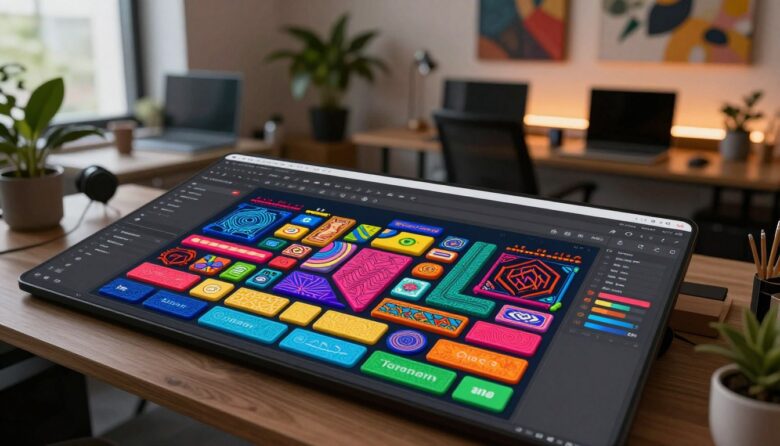
Tactile maximalism uses depth, texture, bold color, distinctive typography, and responsive feedback to give a digital interface a stronger sense of material and personality. The goal is not to cover every surface with effects. It is to make important controls feel recognizable, responsive, and deliberately crafted.
A practical definition: “tactile maximalism” is a useful descriptive label rather than a formal interface standard. In this guide, it refers to intentionally rich digital surfaces that suggest weight, depth, material, and physical response without trying to copy a real object literally.
What tactile maximalism is—and what it is not
A tactile interface gives users visual clues about how elements relate and behave. A raised control appears pressable. A recessed track suggests a value can move inside it. A card with a distinct edge and shadow appears separate from the surface behind it.
Maximalism adds expressive variety: saturated accents, decorative framing, layered illustration, unusual typography, patterns, and carefully controlled visual density. When the two ideas are combined, the result can feel more memorable than a purely flat interface.
Layered
Surfaces use elevation, overlap, borders, shadows, and controlled perspective to establish a readable stacking order.
Expressive
Color, type, imagery, and ornament give the product a recognizable voice instead of making every screen look interchangeable.
Responsive
Interactive elements communicate hover, focus, press, drag, selected, loading, disabled, and completed states clearly.
Systematic
Materials and effects follow reusable rules. The same visual treatment should continue to mean the same thing throughout the product.
Readable
Decorative surfaces never become more important than labels, values, focus indicators, instructions, or error messages.
Adjustable
Non-essential texture, motion, transparency, and visual intensity can be reduced when the audience or context requires it.
Tactile maximalism is not random clutter. More shadows, gradients, patterns, and animation will not repair a weak information structure. The interaction must remain understandable before decorative richness is added.
Try the visual-intensity demonstration
The example below uses the same content and hierarchy at three levels of visual intensity. Notice that the structure, labels, and primary action do not change. Only the material treatment becomes stronger.
A layered interface system combining warm material surfaces, bold controls, and accessible interaction states.
Open projectBalanced mode uses enough material detail to establish identity while preserving a clear reading order.
Where this style works best
A visually rich skin should match the purpose and frequency of the product. Interfaces used for long, repetitive, or safety-critical tasks generally require more restraint than entertainment, music, game, creative, or promotional experiences.
Games and entertainment
Inventory screens, launchers, character menus, rewards, maps, and themed control panels can use material styling to extend the world and reinforce interaction.
Creative software
Music, video, illustration, customization, and design tools can use expressive panels and tactile controls while keeping the work area calm.
Consumer applications
Fitness, lifestyle, community, and media apps may benefit from richer identity around navigation, milestones, and featured content.
Productivity and professional tools
Tactile treatment can distinguish controls and workspaces, but decorative density should not reduce scanning speed or consume valuable data space.
Use restraint in high-stakes contexts. Healthcare, financial, security, industrial, and emergency interfaces may still use depth and responsive feedback, but important values, warnings, and decisions need stable, conventional presentation.
The five layers of a tactile software skin
A strong skin remains usable if the top decorative layer is temporarily removed. That is a useful test of whether the underlying interface is doing its job.
Choose a material language
Tactile design becomes confusing when every component appears to be made from a different substance. Choose a small material vocabulary and assign each treatment a role.
Woven or paper
Useful for calm backgrounds, editorial panels, collections, notes, and crafted visual themes.
Soft or padded
Useful for friendly cards, playful controls, wellness experiences, and approachable game menus.
Metallic or machined
Useful for tools, equipment, premium controls, sci-fi panels, and precise settings.
Glass or polished
Useful for overlays and floating information when transparency remains readable and performant.
Materials do not need to imitate reality perfectly. A card can suggest softness through rounded corners, gentle highlights, and a broad shadow without displaying a literal photograph of fabric.
| Design property | What it can communicate | Useful application | Common risk |
|---|---|---|---|
| Raised shadow | Elevation or pressability | Primary buttons, draggable objects, selected cards | Applying elevation to non-interactive decoration |
| Inset shadow | Recess, track, or contained value | Sliders, wells, input areas, meters | Reducing text and icon contrast |
| Texture | Material identity and area separation | Backgrounds, panels, themed equipment | Making labels harder to read |
| Gloss or highlight | Direction of light and surface curvature | Buttons, knobs, premium cards, badges | Suggesting interactivity where none exists |
| Thick border | Strong separation and focus | Selected items, alerts, active panels | Giving every object equal importance |
| Pattern | Brand, category, rarity, or region | Collections, backgrounds, item classes | Competing with content and focus indicators |
A practical design workflow
Build richness in a controlled order
The workflow begins with an ordinary, usable interface and adds material character one layer at a time.
-
Define the product tone and intensity
Decide what the skin should feel like: playful, mechanical, luxurious, nostalgic, handmade, futuristic, soft, energetic, or something else. Also decide where visual intensity should be low, medium, or high.
- Low intensity for long reading, forms, tables, and settings.
- Medium intensity for navigation, cards, filters, and everyday controls.
- High intensity for rewards, featured content, launches, and optional expressive moments.
-
Design the interface without decoration
Establish navigation, labels, grouping, hierarchy, spacing, states, and responsive behavior first. Use a simple grayscale or limited-color version to confirm that the product remains understandable.
-
Create a depth scale
Define a small set of elevations rather than inventing a new shadow for every component. For example:
- Level 0: background and non-elevated surfaces.
- Level 1: cards and standard containers.
- Level 2: interactive controls and selected objects.
- Level 3: overlays, dialogs, menus, and urgent feedback.
-
Assign material roles
Choose which treatment belongs to backgrounds, containers, interactive controls, selected states, warnings, and rewards. Do not let decoration redefine the meaning of a component from screen to screen.
-
Build stateful components
Every interactive component should have documented default, hover, focus, pressed, selected, disabled, loading, and error states where relevant.
A tactile button should appear to move when pressed, but the state change should also remain understandable through contrast, shape, text, or another stable signal.
-
Add pattern and ornament selectively
Keep the highest visual density away from body text, complex data, and frequently scanned controls. Decorative motifs are often more effective in edges, headers, empty areas, backgrounds, and rare highlight moments.
-
Create calm and reduced versions
Prepare alternatives with less texture, transparency, motion, and decorative contrast. A calm mode can retain brand character through typography, color, spacing, and simplified materials.
-
Test the real tasks
Ask users to find controls, compare values, correct errors, change settings, navigate by keyboard or controller, and complete repeated tasks. Do not test only whether they find the interface attractive.
Design controls that feel responsive
A tactile visual style is most convincing when the interface responds immediately and consistently. The component should visually acknowledge the user’s action and settle into a stable result.
| State | Possible tactile treatment | Essential information | Accessibility check |
|---|---|---|---|
| Default | Stable surface with visible edge and label | Purpose and available action | Readable text and identifiable control |
| Hover | Small elevation, light shift, or border change | Pointer is over the control | Do not depend on hover for essential instructions |
| Keyboard focus | Clear outline or external focus ring | Current keyboard position | Focus must remain visible over every texture |
| Pressed | Reduced shadow and slight downward movement | Input was registered | Avoid long or large motion |
| Selected | Persistent border, marker, shape, or filled state | Choice remains active | Do not use color or elevation alone |
| Disabled | Reduced material intensity and no press response | Action is unavailable | Explain the missing requirement when useful |
| Error | Strong border, label, icon, and nearby explanation | What is wrong and how to recover | Do not rely on red texture alone |
Color and typography need stable surfaces
Highly textured backgrounds can produce different contrast levels behind different parts of the same label. Place important text on a stable surface, use a controlled overlay, or simplify the material behind it.
WCAG 2.2 specifies a minimum contrast ratio of 4.5:1 for normal text and 3:1 for qualifying large text at Level AA. Passing the numerical threshold is a starting point; thin decorative fonts and noisy backgrounds can still be difficult to read.
- Use decorative display type for short headings, badges, or branded moments.
- Use familiar, readable letterforms for instructions, menus, values, and body text.
- Avoid placing text directly over high-detail patterns without a supporting surface.
- Check text, icons, focus rings, borders, and selected states separately.
- Test long translations before fixing card sizes and decorative frames.
- Keep underlines, focus indicators, and error markers visible against every material.
Accessible maximalism can still be bold. Strong contrast, clear focus, readable typography, and redundant state cues often make an expressive interface feel more deliberate rather than less creative.
Make motion optional and meaningful
Motion can strengthen perceived material by showing a button compress, a card settle, a drawer slide along a track, or an item respond to drag. It should explain interaction rather than keep the entire interface in constant movement.
Build a complete reduced-motion experience
A reduced-motion version should preserve all information, states, and actions while removing unnecessary translation, zoom, rotation, parallax, and repeated movement.
Keep
- Visible focus and selected states
- Immediate press confirmation
- Readable loading and completion messages
- Stable hierarchy and grouping
- Text and icon explanations
Reduce or replace
- Large depth shifts and parallax
- Continuous floating or pulsing
- Decorative zoom and rotation
- Long animated text sequences
- Movement that blocks immediate interaction
.tactile-button {
  transform: translateY(-2px);
  box-shadow:
    0 5px 0 #48223f,
    0 9px 18px rgba(72, 34, 63, 0.18);
  transition:
    transform 160ms ease,
    box-shadow 160ms ease;
}

.tactile-button:active {
  transform: translateY(2px);
  box-shadow:
    0 1px 0 #48223f,
    0 3px 7px rgba(72, 34, 63, 0.13);
}

@media (prefers-reduced-motion: reduce) {
  .tactile-button {
    transition: none;
  }

  .tactile-button:active {
    transform: none;
  }
}
For more guidance on motion and animated text, see our article about using kinetic typography purposefully in digital interfaces .
Control performance before adding more effects
A skin that reacts slowly will not feel tactile. Responsiveness depends on stable rendering, efficient assets, appropriate animation properties, and testing on representative hardware.
A lightweight production strategy
Use the richest treatment where it creates the most value, not across every pixel of every screen.
Prefer efficient motion
Opacity and transform animations are generally better starting points than repeatedly animating layout-heavy properties.
Optimize material assets
Use appropriately sized images, compressed formats, reusable vectors, and generated CSS texture when it is simpler.
Test realistic scenes
Measure menus containing real lists, images, overlays, transitions, dynamic values, and lower-powered target devices.
- Avoid stacking many blurred, transparent surfaces over moving content.
- Do not create a unique large texture file for every small component.
- Limit continuous animation when the user is not interacting.
- Review image decoding, memory use, loading behavior, and layout shifts.
- Test high-resolution displays and small mobile devices separately.
- Use progressive enhancement so the basic interface still works without advanced effects.
Useful tools for the workflow
Figma
Use variables, components, styles, effects, gradients, textures, and prototypes to define material rules and reusable states before development.
ProtoPie or Rive
These tools can help explore pressure-like responses, state changes, drag relationships, interactive motion, and more complex tactile behavior.
CSS, SVG, and lightweight JavaScript
CSS gradients, shadows, transforms, masks, and SVG patterns can create many material effects without relying on large image assets.
Accessibility and performance tools
Use browser accessibility inspectors, contrast tools, Lighthouse, performance profiling, keyboard testing, and representative mobile devices.
Designers using Figma can also review our guide to useful Figma plugins for game UI workflows .
How to test whether the richness is helping
Can users identify controls?
Check whether people can distinguish interactive, selected, disabled, decorative, and informational elements without explanation.
Do they notice the right thing first?
Observe whether texture and ornament support the task or pull attention toward secondary decoration.
Does focus remain visible?
Complete every path using keyboard, controller, touch, mouse, and other supported input methods.
Can content be scanned quickly?
Test body text, labels, numbers, errors, tooltips, translations, and large text settings over the final materials.
Is the interface visually exhausting?
Review repeated use, long sessions, motion sensitivity, bright colors, animation frequency, and dense screens.
Does it remain responsive?
Test loading, scrolling, interaction latency, animation stability, memory use, and lower-powered supported devices.
Better research questions
- Which element appears interactive on this screen?
- How do you know which item is currently selected?
- Where would you go to change this setting?
- Which parts of the screen feel decorative rather than functional?
- Did any texture make a label or number difficult to read?
- Would you prefer the same visual intensity during a long session?
- Does the calm version remove anything you need?
Common mistakes
Adding texture before hierarchy
Rich surfaces cannot compensate for unclear grouping, weak labels, or an uncertain primary action.
Making everything look pressable
Strong edges and raised shadows on decoration can create false affordances and frustrate users.
Using different material rules on every screen
A control that appears metallic in one area and soft in another becomes harder to recognize and learn.
Placing text directly over noise
Grain, patterns, highlights, and transparency can create unstable contrast behind labels and values.
Using motion as the only feedback
Press, selection, loading, and error states also need stable visual or textual confirmation.
Keeping maximum intensity everywhere
High-impact treatment becomes ordinary and tiring when no calm space remains around it.
Ignoring content expansion
Decorative frames often break when labels become longer, text is enlarged, or values change dynamically.
Testing only on a powerful computer
Large shadows, filters, transparency, textures, and animation may perform differently on target devices.
Production checklist
- The basic interface works without decoration. Structure, navigation, labels, and states remain understandable in a simplified version.
- Every material treatment has a defined role. Backgrounds, containers, actions, selections, warnings, and rewards follow consistent rules.
- Interactive and decorative elements look different. Users should not need to click objects to discover whether they are controls.
- Text has a stable readable surface. Check all labels and values over final textures, gradients, images, and transparency.
- Keyboard focus remains visible. Focus indicators must survive every color, material, and visual mode.
- States do not depend only on depth or color. Use shape, markers, text, icons, borders, and other redundant signals.
- Reduced-motion behavior is complete. Essential feedback remains available when non-essential movement is removed.
- A calmer presentation is available where appropriate. Consider reducing texture, transparency, motion, visual effects, or decorative density.
- Long and dynamic content has been tested. Include translations, enlarged text, errors, empty states, and changing numbers.
- Representative hardware has been reviewed. Confirm responsiveness, loading, scrolling, rendering, and input behavior on target devices.
Frequently asked questions
Is tactile maximalism the same as skeuomorphism?
Not exactly. Skeuomorphism often imitates a familiar physical object closely. Tactile maximalism can use depth, texture, light, and physical response more abstractly to create character without making the interface look like one literal real-world object.
Can this style work in productivity software?
Yes, but the visual intensity should be controlled. Use material cues to distinguish panels, actions, and selection while keeping data-heavy areas, forms, tables, and long reading relatively calm.
Does adding shadows make an interface tactile?
Shadows can help communicate depth, but they need consistent light direction, elevation rules, clear states, and responsive behavior. Random shadows may add noise without improving interaction.
How many textures should one interface use?
There is no fixed number. A small, reusable material vocabulary is easier to understand than a different texture for every component. Begin with one primary surface, one supporting material, and a limited accent treatment.
Can maximalist interfaces be accessible?
Yes. Accessibility depends on readable contrast, clear states, semantic structure, visible focus, flexible input, reduced motion, text scaling, and careful testing—not on whether the visual style is minimal or maximal.
Should every tactile interaction include animation?
No. A border, shadow, color, label, sound, or haptic response may communicate the result without noticeable movement. Use animation only when it helps explain the relationship between states.
How can the style remain fast on mobile devices?
Use optimized assets, limit large blurred and transparent layers, avoid unnecessary continuous animation, test representative devices, and prefer simpler treatments for frequently repeated components.
Should users be allowed to reduce visual intensity?
It can be valuable for products with strong texture, motion, transparency, or long sessions. A calm mode can preserve the same information and brand identity while reducing non-essential visual stimulation.
Final perspective
Tactile maximalism works when richness improves recognition, feedback, hierarchy, and identity. It fails when decoration makes controls harder to find, text harder to read, or the interface slower to operate.
Begin with a stable structure. Define a small material language, create a controlled depth scale, document component states, and reserve the strongest treatment for moments that deserve attention.
The best result is not an interface that imitates a physical object perfectly. It is a digital environment that feels responsive, memorable, and comfortable because every layer has a clear reason to exist.
Official accessibility and performance references

The Skinning Toolkit Editorial Team creates practical content about game UI design, UX strategy, accessibility, prototyping, and digital design tools. Our articles are researched using official documentation, reliable industry sources, and real interface examples to help designers build clearer, more accessible, and engaging user experiences.